
Sign safety instructions electronically
 Sign safety instructions electronically">
Legal certainty
Simple documentation
Seamless integration
Avoid a flood of paper
Traceability
The initial situation
Is the signing of safety instructions – designed to protect your employees’ health, ensure safety in the workplace and provide guidance to hauliers on the safe transport of goods – an important issue within your organisation?
Do you want to replace the existing paper-based signature process with a digital signature process that is seamlessly integrated into your SAP application? With the aim of documenting the process seamlessly, legally compliant and cost-optimised?

Changed requirements
The top priority – particularly in manufacturing companies and those that handle hazardous substances – is to guarantee the health of employees, safety in the workplace and the safe and secure transport of goods.
Accidents and health hazards are usually caused by human error. The only effective measures against this are regular safety briefings. The responsibility for this lies with the employer or management.
Safety training therefore minimises risks, improves employee health and increases occupational safety.
In order to avoid any legal consequences for the company and its employees, these briefings – including updates and refresher sessions on topics and content – must be meticulously documented and confirmed by the signature of the person receiving the briefing.
This is a classic use case for the digital mapping of safety instructions, including the electronic capture of signatures on a signature pad.
Solution
Simple application - flexibly configurable
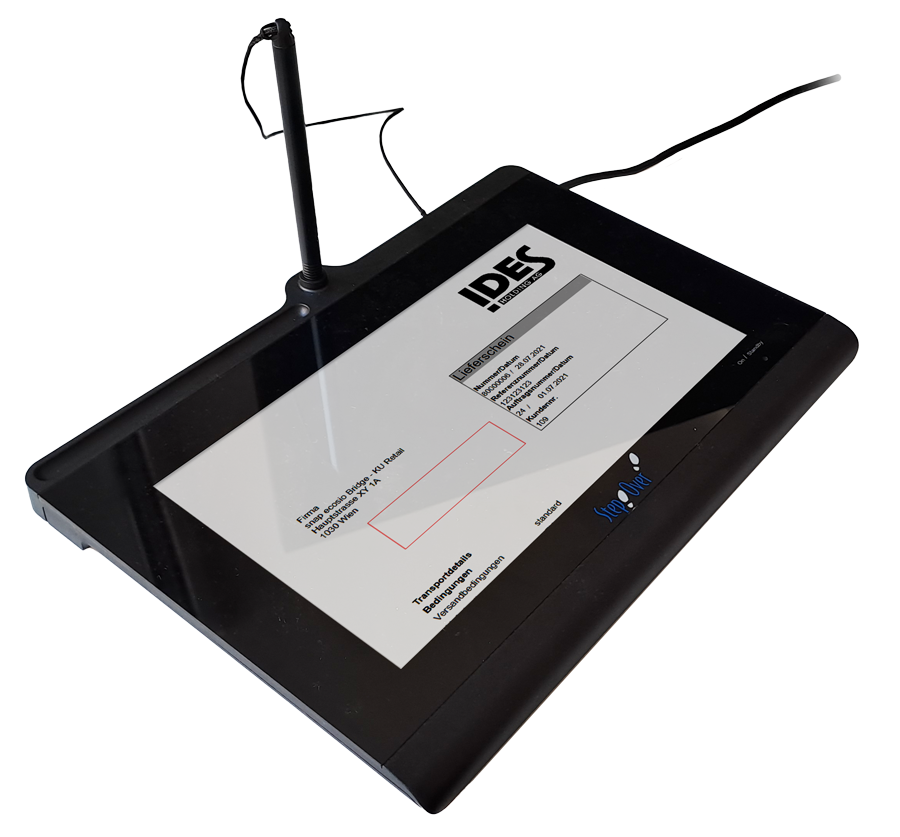
At workstations where safety instructions are to be signed, the Windows-based application, e-Sign Agent, must be installed; when required, it is launched directly from the relevant SAP® application and displays the safety instructions on screen in PDF format. A signature pad is connected via USB or, optionally, directly via the network. If required, the signatory can read the document directly on the screen or on the signature pad’s display and then provide their signature using the stylus on the pad.
During the signing process, not only is the image of the signature captured, but the biometric data relating to the signature (pressure, speed and direction of writing) is also stored in encrypted form. In addition, the hash value (the document’s unique fingerprint) is digitally signed, protecting the document against subsequent tampering. Two birds with one stone!
Automatic, context-based archiving in the existing SAP® archive following successful signing forms part of the overall process.
Part of the configuration is that the signatory is guided step-by-step through the document – where necessary – thereby ensuring that the full security instructions are read.
Seamlessly integrated and legally compliant
The e-Sign Agent can be quickly integrated into your existing infrastructure and, thanks to its ease of use, makes your day-to-day work considerably easier. As an entrepreneur or managing director, you can use it to fulfil your responsibilities and ensure compliance with all the necessary regulations.
Your added value
Focus on occupational safety and accident prevention
Traceable documentation
Compliance/avoidance of liability
Seamless integration
Current blogs

15 years of partnership between StepOver and r>it
Both companies can look back on 15 years of successful collaboration/partnership. Through [...]


 Deutsch (Österreich)
  English (UK)
  Português