
Sign your document directly from the arveo Content Services Platform
 Sign your document directly from arveo">
Out-of-the-box integration in DOXIS
Various signature methods
Process acceleration
Cost-efficient start
Scalable to any size
The initial situation
Would you like to download contract documents from the arveo Content Services Platform the EITCO GmbH legally secure electronic signature?
Do you need flexible signature methods, such as signing using a signature pad, German ID card or mobile remote signature (eID, primeSign)?
Changed requirements
Due to a lack of process optimisation, existing contract documents in arveo are often still printed, distributed internally, signed by hand, scanned and sent to external contractual partners as required.
Printing, signing, scanning, forwarding, saving - that was yesterday. Leave media disruptions behind and enter the 21st century! With efficient, traceable, secure and resource-saving processes.
Different IT systems, the need to integrate business partners and strict compliance regulations require the use of electronic signature solutions that are secure and traceable.
Solution
High process acceleration
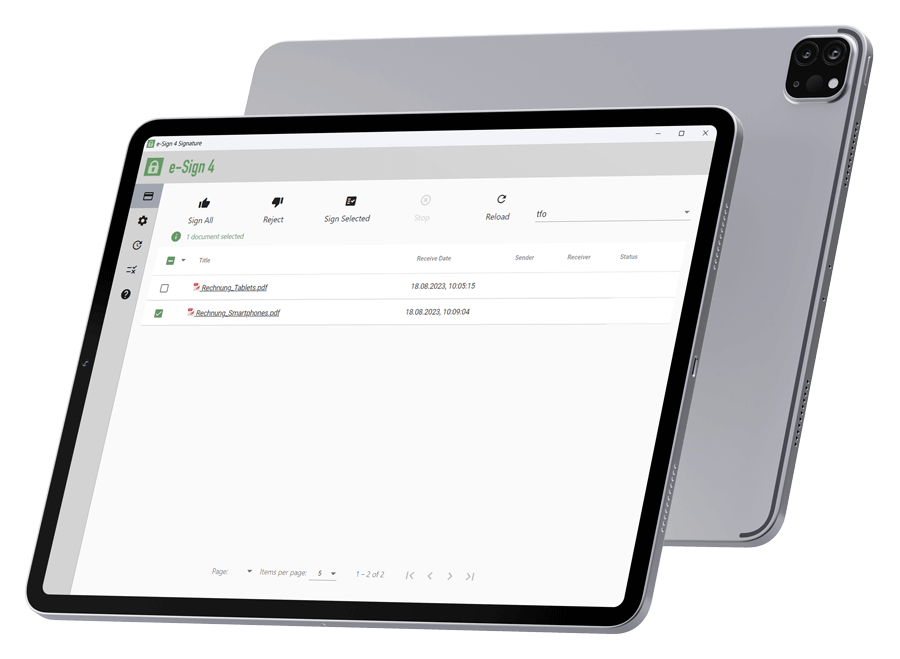
Our client software, the e-Sign Agent, is seamlessly integrated into DOXIS so that you can sign your documents, such as contracts, simply and easily in DOXIS. arveo Content Services Platform from EITCO integrated.
After opening the PDF document directly in arveo, the signature process can be started by clicking on the menu item „Sign“. Depending on your needs and legal requirements, you can select the following signature methods:
- Manual signature on the signature pad
- Remote remote signature (primesign MOBILE, TRUST2GO)
- ID Austria
- German identity card
The required signature can be provided in the document either in a fixed position or in a flexible position by the person.
When signing manually on the signature pad, the biometric data (font size, speed and x/y coordinates) are stored in encrypted form in the document. The latter is also automatically digitally signed and is thus protected against subsequent, unwanted changes.
If you would like to sign with a remote signature, you will need to identify yourself at least once using an eID or German ID card.
Once signed, the document is sent to the arveo Content Services Platform archived and is available for further process steps.
Flexible expansion stages
Do you need to sign several documents fully automatically in a batch using a company seal? Then e-Sign 4 is the right choice. Also seamlessly integrated into the arveo Content Services Platform, it enables batch signing without the need for user interaction using a company seal.
Your added value
Signature processes are accelerated
Corporate image is strengthened
Different technical signature methods can be used in combination
Sensitive data is secure
Legal liability is increased
Current case studies

 Deutsch (Österreich)
  English (UK)
  Português