
Sign your document directly from the arveo Content Services Platform
 Sign your documents directly from arveo">
Out-of-the-box integration in DOXIS
Various signature methods
Process acceleration
Cost-efficient start
Scalable to any size
The initial situation
Would you like to view contract documents from the arveo Content Services Platform the EITCO GmbH legally secure electronic signature?
Do you require flexible signature methods, such as signing via a signature pad, a German identity card or a mobile remote signature (eID, primeSign)?
Changed requirements
Due to a lack of process optimisation, contract documents stored in arveo are often still printed, distributed internally, signed by hand, scanned and, where necessary, sent to external contractual partners.
Printing, signing, scanning, forwarding, saving - that was yesterday. Leave media disruptions behind and enter the 21st century! With efficient, traceable, secure and resource-saving processes.
Diverse IT systems, the need to integrate business partners and strict compliance regulations necessitate the use of electronic signature solutions that are secure and traceable.
Solution
High process acceleration
To enable you to sign your documents, such as contracts, electronically in DOXIS in a simple and straightforward manner, our client software, the e-Sign Agent, is seamlessly integrated into the arveo Content Services Platform from EITCO integrated.
Once you have opened the PDF document directly in arveo, you can start the signing process by clicking on the „Sign“ menu item. Depending on your needs and legal requirements, you can select from the following signature methods:
- Manual signature on the signature pad
- Remote remote signature (primesign MOBILE, TRUST2GO)
- ID Austria
- German identity card
The required signature can be provided in the document either in a fixed position or in a flexible position by the person.
When signing manually on the signature pad, the biometric data (font size, speed and x/y coordinates) are stored in encrypted form in the document. The latter is also automatically digitally signed and is thus protected against subsequent, unwanted changes.
If you wish to sign using remote electronic signature, you will need to verify your identity at least once using an eID or a German identity card.
Once the document has been signed, it will be stored in the arveo Content Services Platform It is archived and remains available for further stages of the process.
Flexible expansion stages
Do you need to sign multiple documents in batches, fully automatically, using a company seal? If so, e-Sign 4 is the right choice. It is also seamlessly integrated into the arveo Content Services Platform, enabling batch signing using a company seal without the need for user interaction.
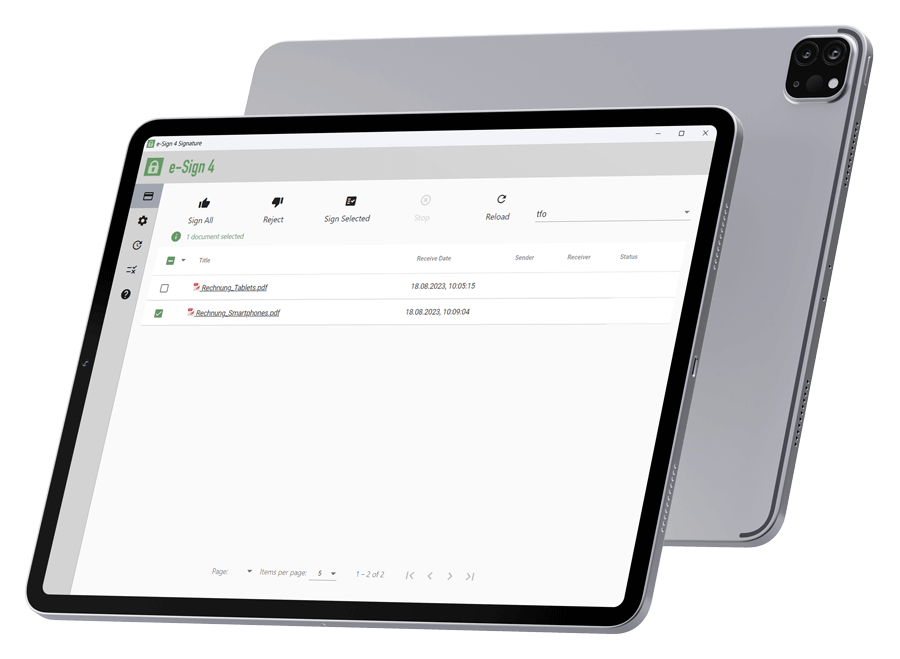
Your added value
Signature processes are accelerated
Corporate image is strengthened
Different technical signature methods can be used in combination
Sensitive data is secure
Legal liability is increased
Current case studies

 Deutsch (Österreich)
  English (UK)
  Português